// STRATEGY GUIDE //

The Strategy Guide — every setting, plainly

Kirby Ultimate Trader's settings are configuration choices, not recommendations — none of them is the right one, and every one of them can be changed later. This guide walks each option in the order you meet it, shows where it lives in the app, and describes why customers choose differently.

// HOW TO THINK ABOUT THE SETTINGS //

What this guide is for

Kirby Ultimate Trader has a small number of settings, and each one changes what you will see the automated trading system do with your account. This guide walks them in the order you meet them in the app, explains plainly what each one does, and describes — honestly, without recommending — why different customers choose differently.

Two things to hold on to before you start. First, these are configuration choices, not recommendations: none of them is the “right” one, and this guide never ranks them. Second, every choice here can be changed later — nothing you pick during setup locks you in. If you have not installed and activated the app yet, start with the Getting Started guide and come back here when the settings screens appear.

// CAPITAL ALLOCATION //

Shared Balance vs. Split Balance

The app contains two independent engines — Trend and Grid — and Capital Allocation decides how they draw on your account. Shared Balance, the default, gives both engines one combined balance: cash one engine is not using is immediately available to the other. Split Balance divides your capital between the engines by a ratio you choose; from then on each engine keeps its own ledgered balance and compounds its own gains, like two accounts inside one. Your broker still sees a single account either way, and your total money at work is the same either way.

The ratio you set is the initial division only. There is no automatic rebalancing: the two balances drift apart with each engine's own results, and that drift is by design. You can convert an already-running account to Split at any time — nothing is ever sold to force the division. If one engine already holds more than its share, the app routes that engine's future banked gains to the other until your chosen split is reached, while both trade normally the whole time; the app calls this balancing period Convergence and shows its progress. Merging back to Shared is instant: the balances simply pool.

Why customers choose one or the other. Customers who pick Shared Balance usually want every idle dollar available to whichever engine finds the next opportunity, with nothing sitting still. Customers who pick Split Balance usually want the two engines' results kept separate — some because they would rather one engine's drawdown not reduce what the other has to work with, some because they want a clean per-engine record of what each strategy earns. Total account exposure is the same in both modes; what changes is which pool each engine sizes against.
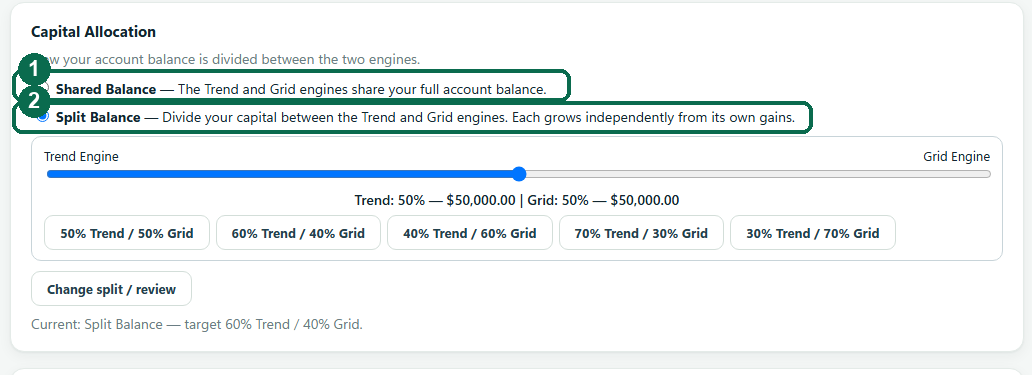

Annotated Capital Allocation setting with the Shared Balance and Split Balance options marked, and the current-mode line highlighted.
Capital Allocation lives in Preferences, and also appears as Step 3 of first-time setup.
// THE RATIO //

Choosing a ratio

If you pick Split Balance, a slider divides your capital. The labels always name the engine with a percentage and a dollar amount — “Trend: 60% — $6,000 | Grid: 40% — $4,000” on a $10,000 account — and preset buttons snap to common divisions. The confirmation spells out exactly what each engine will start with before anything changes.

What leaning one way or the other means in practice. A trend-heavy split gives more capital to the engine that takes bracketed positions with defined exits, so its individual positions will be larger. A grid-heavy split gives more capital to the engine that builds ladders in dividend-paying names, so it can run more rungs at once. Customers lean toward the engine whose day-to-day behavior they prefer watching — the next sections describe what each engine's activity looks like — and customers who have no preference commonly start at 50% / 50% and revisit later.

Annotated ratio slider with the engine names, percentages and dollar amounts marked, and the preset buttons indicated below the slider.
The labels always name the engine with its percentage and dollars — there is never a bare number to misread.
// PROFIT HANDLING //

Growth Mode vs. Income Mode

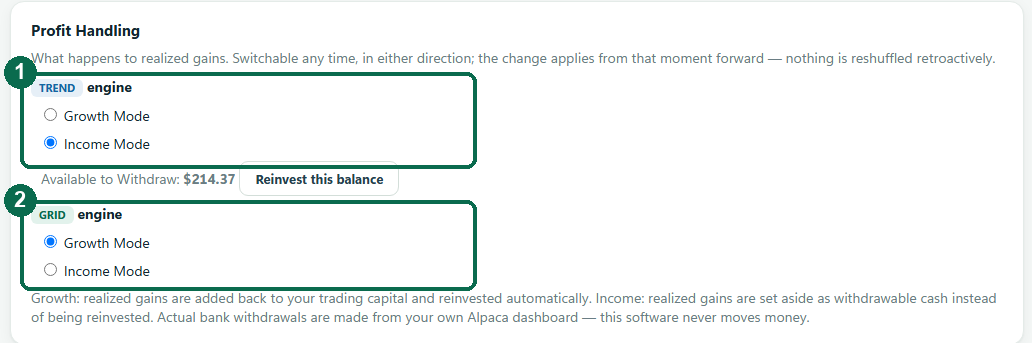
Profit Handling decides what happens to realized gains — the profit of trades that have actually closed. Growth Mode, the default, is reinvestment: gains join your trading capital automatically. The Trend engine sizes its positions off current equity, so as the account grows its positions grow with it; the Grid engine accumulates gains into its reserve and deploys new ladder positions from it.

Income Mode sets realized gains aside instead. The set-aside money shows on the main screen as “Available to Withdraw”, the engines never trade with it, and your trading capital stays level rather than compounding. If a later trade loses, the loss is deducted from the set-aside figure first — so “Available to Withdraw” is always your net realized profit since you switched the mode on, never money borrowed from your starting capital. The actual bank transfer happens from your own Alpaca dashboard, like any brokerage withdrawal; the app never moves money itself. A “Reinvest this balance” button puts the set-aside money back into trading capital whenever you choose.

Both directions switch at any time, with effect from that moment forward — nothing is reshuffled retroactively. Switching to Growth keeps anything already set aside visible and withdrawable until you press Reinvest; switching to Income starts the set-aside figure at zero.

Why customers choose one or the other. Customers who pick Growth Mode usually want compounding — gains going straight back to work. Customers who pick Income Mode usually want to see realized profit accumulate as a separate withdrawable figure while their trading capital stays at its base size. Which behavior you want from realized gains is the whole difference; the engines trade the same way in both modes.

Annotated Profit Handling setting with the Growth Mode and Income Mode options marked for each engine.
Growth reinvests realized gains automatically; Income sets them aside as withdrawable cash.
Annotated dashboard with the Available to Withdraw figure marked, showing set-aside gains next to the account tiles.
“Available to Withdraw” only ever shows net realized profit — losses come out of it first.
// PER-ENGINE PROFIT HANDLING //

Per-engine profit handling in Split Balance

In Split Balance, Profit Handling is set per engine: each has its own Growth / Income switch and its own set-aside figure. One engine can compound while the other sets its gains aside.

Why customers use this. The common pattern is one engine in Growth to keep compounding and the other in Income to accumulate withdrawable gains — which engine plays which role is purely the customer's preference. In Shared Balance there is a single account-wide switch instead.

Annotated dashboard in Split Balance with the per-engine balances marked, showing each engine's own cash, holdings, gains since the split and cash available to it.
Split Balance gives each engine its own balance card — its cash, what it is holding, its gains since the split and what it has available — and its own profit-and-loss chart alongside the whole-account one.
// ENGINE MIX //

Running both engines, or leaning to one

The Active strategies setting runs both engines or just one, and Split Balance can lean the capital heavily toward either. The two engines behave differently, and the difference shapes what you will see day to day.

The Trend engine takes bracketed positions with defined exits: each position is placed with its stop and its target already attached, and it resolves at one or the other. Trend trades are less frequent, positions are fewer and larger, and days or weeks can pass quietly between entries. The Grid engine builds laddered positions in dividend-paying names and sells rungs back as prices recover: many small positions, frequent small closes, and activity on most trading days.

Why customers choose their mix. Customers who favor the Trend engine usually prefer a quieter account with fewer, larger, clearly-bracketed trades. Customers who favor the Grid engine usually prefer steady visible activity in smaller pieces. Running both — the default — gives the two behaviors side by side; turning one off simply stops it opening new positions while anything it holds is still managed to its exit.

What the screen shows follows what you run. The Dashboard only shows the engines that apply to your setup. Run one engine and the other’s cards, chart line and table column are not displayed. Run Split Balance and each engine gets its own balance and its own profit-and-loss chart, next to the whole-account view. An engine you switch off while it still holds positions keeps its card and says in words that it is managing them to their exits, so nothing about money you still own leaves the screen.

// TREND RISK //

Trend risk percentage

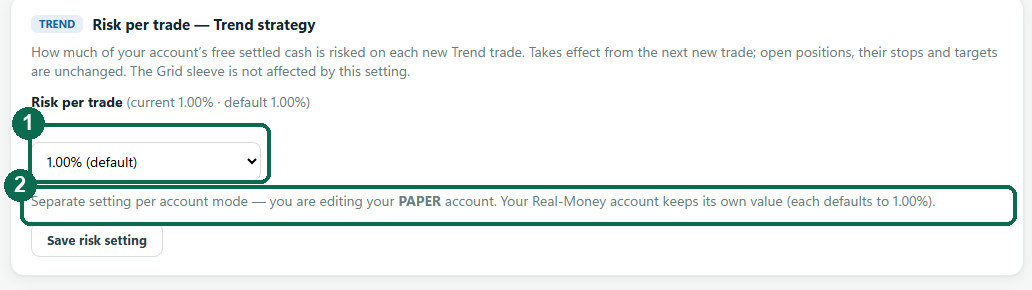
The Trend engine's Risk per trade selector runs from 0.25% to 3.50% in 0.25 steps, with 1.00% as the default. It is the share of the engine's free cash put at risk on each new Trend trade: at 1.00% on $10,000, a trade is sized so that hitting its stop loses roughly $100. A higher setting means larger positions — larger gains when a trade works and larger losses when it does not. Paper and real-money modes keep separate values, and a change applies to the next new trade only.

In Growth Mode the setting compounds with equity: 1.00% of a growing account is a growing dollar amount. In Income Mode trading capital stays at its base size, so the dollar risked stays level as well. The Grid engine is not affected by this setting.

Why customers choose different values. Customers at lower settings usually want each individual trade to matter less to the account; customers at higher settings accept bigger swings per trade in exchange for bigger positions. The default exists so that no one has to decide this before seeing the app trade.

Annotated Risk per trade selector with the 1.00% default marked and the paper-versus-live note indicated.
Each account mode keeps its own value; a change affects new trades only.
// WORKED EXAMPLES //

Three complete configurations

These are illustrations of how the settings combine — not recommendations. The figures are round numbers chosen for arithmetic, not targets, and nothing here describes performance.

Example 1 — everything at defaults. Shared Balance · Growth Mode · both engines · Trend risk 1.00%. On $10,000, both engines draw on one pool, all realized gains reinvest automatically, and the account compounds as one number. Day to day this customer sees a single combined balance and both engines' activity in one list.

Example 2 — split, one side set aside. Split Balance 50% / 50% · Trend engine in Growth · Grid engine in Income · Trend risk 1.00%. On $10,000, each engine starts with $5,000. The Trend side compounds its own gains; the Grid side's realized gains accumulate as “Available to Withdraw” while its trading capital stays near $5,000. Day to day this customer sees two engine balances and a set-aside figure that moves only when Grid trades close.

Example 3 — trend-heavy, everything set aside. Split Balance 70% Trend / 30% Grid · both engines in Income · Trend risk 0.50%. On $10,000, Trend starts with $7,000 and sizes each trade at 0.50% of its own free cash; Grid runs a smaller ladder from $3,000. All realized gains from both engines land in the set-aside figures, and both engines' trading capital stays at its starting size. Day to day this customer sees quieter, larger Trend positions, a small steady Grid ladder, and two set-aside figures.

// CHANGING YOUR MIND //

Everything here is reversible

Allocation and Profit Handling both switch at any time. Merging Split back to Shared is instant — the balances pool and nothing is sold. Switching Shared to Split takes effect immediately when the division fits the account as it stands, and otherwise balances over time through normal trading (the Convergence period described above) — again with nothing sold. Profit Handling changes apply from the moment you switch, in either direction. The engine mix and the Trend risk setting apply to new positions only; anything already open is always managed to its normal exit. For installation, activation, and day-to-day operation, see the Getting Started guide.

PreviousGetting Started